|
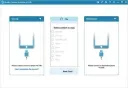
Switch to a new phone and wish to move data from the old phone to the new one? Or simply wish to share something between two different devices? MobiKin Transfer for Mobile can help you finish the data transference easily.
Transfer Files to Android Device with Ease
Can't find an effective way to transfer data from old phone to your new Android device? Don't worry! MobiKin Transfer for Mobile makes it easy for you to copy data from one device (iDevice/Android) to another mobile phone without restrictions. All transmission can be done with 1 simple click and risk-free.
• Android to Android Transfer: copy contacts, text messages, call logs, music, videos, photos, documents and apps between two Android phones.
• iOS to Android Transfer: sync contacts, SMS, music, videos, photos and books from iOS device to an Android phone.
• Clear Data before Copying: remove the saved data on your destination Android phone before you transfer the data.
Switch to A New iDevice with One Click
Getting a new iPhone/iPad/iPod and can't wait to enjoy the wonderful device? Just see here! MobiKin Transfer for Mobile can help you switch to the new iDevice with one simple click. In addition, the transfer is very fast and no any quality will be lost during the moving process. Now just see what this program can do for you
• Android to iOS Transfer: support to transfer contacts and books from Android phone to an iDevice.
• iOS to iOS Transfer: support to copy contacts, calendars, notes, bookmarks and books between iOS devices.
Backup & Restore The Data on Your Devices without Data Loss
For upgrading your mobile phone to the latest one or switching it from one to another with different carrier, you may need to move something important between them. But during the moving process, you may wrongly delete or accidentally damage the data. So to avoid this issue, you can use MobiKin Transfer for Mobile to
• Easily back up the data on your iPhone or Android to PC/Mac without losing data.
• Restore the backed up data from iTunes backups to your device as you like.
Support for 3000+ Phones
Since this software is designed to help users transfer contents between different mobile phones, so it is no doubt that the program can work well with various phones from different manufacturers. And after hundreds of tested from our technical team, we have proved that this software works well with almost 3000+ mobile phones.
• iDevices: iPhone 11, iPhone 11 Pro, iPhone 11 Pro Max, iPhone XS Max, iPhone XS, iPhone XR, iPhone X, iPhone 8, iPhone 8 Plus, iPhone 7, iPhone 7 Plus, iPhone 6S, iPhone 6S Plus, iPhone 6, iPhone 6 Plus, iPhone 5S, iPhone 5, iPhone 4, iPhone 4S, iPad Air/mini, the new iPad, iPod touch, iPod classic, etc.
• Android Devices: Samsung Galaxy, HTC, Motorola, Sony, LG, Xiaomi, Huawei, ZTE, etc.
Release Notes
1) Optimized device connection.
2) Fixed bugs.
System Requirements: Windows 11/10/8/7/XP/Vista
Instruction:
1. Install the target application but don't start it.
2. Copy crack dll file in install directory in folder Bin.
3. OPTIONAL (only if the program is not registered yet): Go to Help -> Register or click Register button and complete the registration dialog using the following info:
Licensed E-Mail (if required):
(any valid e-mail you want)
Registration Code (or use Copy Fake Code button):
1234567890
and click Register button.
Przechodzisz na nowy telefon i chcesz przenieść dane ze starego na nowy? A może po prostu chcesz udostępnić coś między dwoma różnymi urządzeniami? MobiKin Transfer for Mobile pomoże Ci łatwo dokończyć przesyłanie danych.
Łatwe przesyłanie plików na urządzenie z Androidem
Nie możesz znaleźć skutecznego sposobu na przeniesienie danych ze starego telefonu na nowe urządzenie z Androidem? Nie martw się! MobiKin Transfer for Mobile ułatwia kopiowanie danych z jednego urządzenia (iDevice/Android) na inny telefon komórkowy bez ograniczeń. Cała transmisja odbywa się jednym kliknięciem i jest bezpieczna.
• Przesyłanie z Androida na Androida: kopiuj kontakty, wiadomości tekstowe, rejestry połączeń, muzykę, filmy, zdjęcia, dokumenty i aplikacje między dwoma telefonami z Androidem.
• Przesyłanie z iOS na Androida: synchronizuj kontakty, SMS-y, muzykę, filmy, zdjęcia i książki z urządzenia z iOS na telefon z Androidem.
• Wyczyść dane przed kopiowaniem: usuń zapisane dane z docelowego telefonu z Androidem przed przeniesieniem danych.
Przejdź na nowe urządzenie iDevice jednym kliknięciem
Kupujesz nowego iPhone'a/iPada/iPoda i nie możesz się doczekać, aby cieszyć się tym wspaniałym urządzeniem? Sprawdź tutaj! MobiKin Transfer for Mobile pomoże Ci przejść na nowe urządzenie iDevice jednym kliknięciem. Co więcej, transfer jest bardzo szybki i nie powoduje utraty jakości podczas przenoszenia. Zobacz, co ten program może dla Ciebie zrobić.
• Transfer z Androida na iOS: obsługa przesyłania kontaktów i książek z telefonu z Androidem na urządzenie iDevice.
• Transfer z iOS na iOS: obsługa kopiowania kontaktów, kalendarzy, notatek, zakładek i książek między urządzeniami z systemem iOS.
Twórz kopie zapasowe i przywracaj dane na swoich urządzeniach bez utraty danych
Aby zaktualizować telefon komórkowy do najnowszej wersji lub przenieść go z jednego operatora na drugiego, może zaistnieć potrzeba przeniesienia ważnych danych między nimi. Jednak podczas przenoszenia danych możesz omyłkowo usunąć lub przypadkowo uszkodzić dane. Aby uniknąć tego problemu, możesz użyć MobiKin Transfer for Mobile, aby:
• Łatwo tworzyć kopie zapasowe danych z iPhone'a lub Androida na komputerze PC/Mac bez utraty danych.
• Przywracać dane z kopii zapasowych iTunes na urządzenie w dogodny dla siebie sposób.
Obsługa ponad 3000 telefonów
Ponieważ to oprogramowanie zostało zaprojektowane z myślą o ułatwieniu użytkownikom przesyłania treści między różnymi telefonami komórkowymi, nie ma wątpliwości, że program będzie działał dobrze z telefonami różnych producentów. Po setkach testów przeprowadzonych przez nasz zespół techniczny udowodniliśmy, że oprogramowanie działa dobrze z ponad 3000 telefonów komórkowych.
• Urządzenia iDevices: iPhone 11, iPhone 11 Pro, iPhone 11 Pro Max, iPhone XS Max, iPhone XS, iPhone XR, iPhone X, iPhone 8, iPhone 8 Plus, iPhone 7, iPhone 7 Plus, iPhone 6S, iPhone 6S Plus, iPhone 6, iPhone 6 Plus, iPhone 5S, iPhone 5, iPhone 4, iPhone 4S, iPad Air/mini, nowy iPad, iPod touch, iPod classic itp.
• Urządzenia z systemem Android: Samsung Galaxy, HTC, Motorola, Sony, LG, Xiaomi, Huawei, ZTE itp.
Informacje o wydaniu
1) Zoptymalizowane połączenie z urządzeniem.
2) Naprawione błędy.
Wymagania systemowe: Windows 11/10/8/7/XP/Vista
Instrukcja:
1. Zainstaluj aplikację docelową, ale jej nie uruchamiaj.
2. Skopiuj plik dll cracka do folderu instalacyjnego w folderze Bin.
3. OPCJONALNIE (tylko jeśli program nie jest jeszcze zarejestrowany): Przejdź do Pomocy -> Zarejestruj się lub kliknij przycisk Zarejestruj i wypełnij okno dialogowe rejestracji, podając następujące informacje:
Adres e-mail z licencją (jeśli wymagany):
(dowolny, prawidłowy adres e-mail)
Kod rejestracyjny (lub użyj przycisku Kopiuj fałszywy kod):
1234567890
i kliknij przycisk Zarejestruj.
|