|
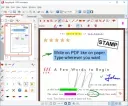
PDF Annotator lets the user open any PDF file and add annotations, using the mouse or a Tablet PC pen, directly on the PDF file's pages. The annotated documents can then be saved directly back to PDF format. In this way, anyone can read or print the annotated PDF documents. Annotated documents can also be easily attached to emails.
Previously, annotating, commenting or proofreading a document received for review in PDF file format was possible only by using multiple software products in a row--or only by printing the document and adding comments manually. With PDF Annotator, annotations can also be added in a natural way--using a pen--but everything remains in digital format. PDF Annotator allows commenting of PDF files in a single step.
Annotation Manager in the Sidebar
- Get a quick overview of all annotations in a document.
- Navigate to any annotations quickly.
- Perform operations on any selection of annotations.
Filter Annotations
- Only display a filtered subset of your annotations in the new Annotations sidebar.
- Filter by type, color, or page number.
Print Annotations Overviews
- Print a detailed list with small previews of every single annotation in a document.
- Print an overview only outlining the pages containing annotations.
System Requirements: Windows 10, 11
Instruction:
1. Run the setup file.
2. copy the crack file into the file dir and Enjoy...
Program PDF Annotator umożliwia otwieranie dowolnego pliku PDF i nanoszenie na jego strony adnotacji za pomocą myszy lub pióra tabletu (Tablet PC). Tak opracowane dokumenty można zapisać ponownie w formacie PDF, dzięki czemu każdy może je odczytać lub wydrukować. Dokumenty z naniesionymi uwagami można również łatwo dołączać do wiadomości e-mail.
Wcześniej nanoszenie adnotacji, komentowanie czy korekta dokumentów w formacie PDF wymagały korzystania z kilku różnych programów lub wydrukowania pliku i ręcznego dodawania uwag. Dzięki PDF Annotator adnotacje można nanosić w sposób naturalny – za pomocą pióra – przy zachowaniu pełnej cyfrowej formy dokumentu. PDF Annotator pozwala na komentowanie plików PDF w ramach jednego, sprawnego procesu.
Menedżer adnotacji w panelu bocznym
- Szybki przegląd wszystkich adnotacji w dokumencie.
- Błyskawiczne przechodzenie do wybranych adnotacji.
- Wykonywanie operacji na dowolnym zestawie zaznaczonych adnotacji.
Filtrowanie adnotacji
- Wyświetlanie tylko wybranych adnotacji w panelu bocznym.
- Filtrowanie według typu, koloru lub numeru strony.
Drukowanie zestawień adnotacji
- Drukowanie szczegółowej listy zawierającej miniaturowe podglądy każdej adnotacji.
- Drukowanie zestawienia wskazującego strony, na których znajdują się adnotacje.
Wymagania systemowe: Windows 10, 11
Instrukcja:
1. Uruchom plik instalacyjny.
2. Skopiuj plik „crack” do folderu z zainstalowanym programem i gotowe!
|